Every server-side tracking quote I have seen understates the bill by roughly half. Not because vendors lie, but because the price everyone compares is the hosting line — and hosting is the cheapest part of running this thing.
I have moved four B2B SaaS companies onto server-side tracking in the last two years. In each case the finance conversation went the same way: someone found a blog post quoting a monthly figure, budgeted for it, then discovered three months later that the real number was two to three times higher. Nothing had gone wrong technically. The estimate had simply left out the parts that do not appear on an invoice.
So this is the cost model I use now when a client asks whether server-side is worth it. No vendor prices quoted — those move every quarter and any number I print here will be wrong by the time you read it. What follows is the structure of the bill, and the arithmetic to fill it in with today’s prices.
The five lines on the real bill
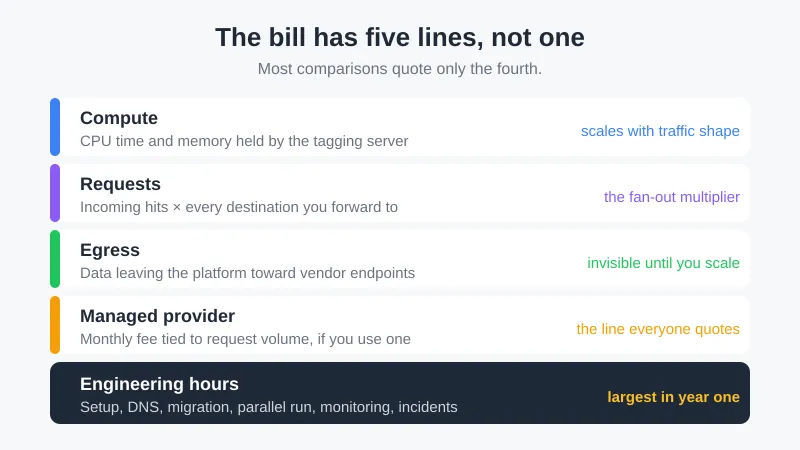
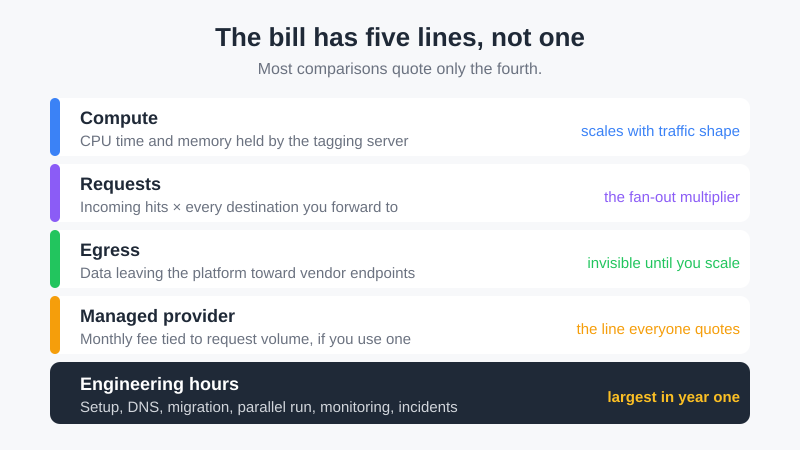
Server-side tracking replaces one browser request with an owned pipeline. That pipeline costs money in five separate places, and only the first is what people mean when they say “it costs about X per month”.
Compute. Your tagging server runs somewhere — Cloud Run, a managed provider, your own container platform. Charged by CPU time and memory held, and the pricing model rewards traffic that arrives in bursts rather than trickling in all day.
Requests. Every hit from every visitor, plus every downstream call the server makes to Google, Meta and whoever else is in your stack. The two directions are billed differently, and that is where most estimates go wrong. Managed providers meter what arrives: Stape’s own documentation warns that incoming request volume runs around 30% above your GA4 event count, because script loads such as gtm.js and gtag.js are hits too. What leaves is charged another way — every outbound call holds CPU and memory for a moment longer and adds to egress, so a page view forwarded to five destinations lands five times in the compute line even where it counted once on the request line.
Egress. Data leaving the platform toward vendor endpoints. Small per gigabyte, and invisible until traffic scales.
The provider, if you use one. Managed services take the container work off your hands and charge a monthly fee tied to request volume. This is the line most comparisons treat as the total.
Engineering hours. Setup, DNS and certificates, tag migration, the parallel run, monitoring, and the afternoons somebody spends on it when requests stop arriving. In every one of my four migrations this line was larger than all four above put together in year one.
Working out your own number
The inputs are things you already know or can pull in ten minutes.
Start with monthly page views from your analytics. Multiply by the number of destinations your server will forward to — GA4, an ads platform, a CRM webhook, each one is a call. That gives you outbound events, and it is usually the number that surprises people: a site doing 200,000 monthly page views with four destinations is producing something closer to a million server-side events.
Then take today’s rates from the platform you are considering. Cloud Run publishes its per-vCPU-second, per-GiB-second and per-request pricing, and managed providers publish request tiers on their own pages. Put your event count against those tiers rather than trusting anyone’s headline “from $X” figure, including mine.
| Profile | Page views / month | Destinations | Outbound events / month | Line that dominates |
|---|---|---|---|---|
| Product-led B2B, self-serve signups | 40,000 | 3 | 120,000 | Engineering hours |
| Mid-market SaaS buying paid traffic | 200,000 | 4 | 800,000 | Provider tier |
| High-volume storefront | 1,000,000 | 6 | 6,000,000 | Compute and egress |
The first row is the one that surprises finance teams: at that volume every infrastructure line is small enough to disappear into a rounding error, and the project still costs real money, because the money is a person’s time. The third row is the opposite — the people cost is amortised across so much traffic that the container becomes the argument. Most SaaS companies I work with sit on the second row, where the provider fee is the visible number and the parallel run is the one that blows the quarter.
Two adjustments matter more than the arithmetic itself.
The first is minimum instances. Running the container warm costs money around the clock, including at four in the morning when nobody is on your site. Running it cold saves that money and adds latency to the first hit after an idle period, which in practice means dropped events during quiet hours. For a business with steady global traffic the warm instance pays for itself. For a regional B2B product with a nine-to-five audience, it is often the single biggest waste in the bill.
The second is what you actually forward. Most setups I inherit forward everything to everyone because that was the default when the container was built. Cutting the fan-out to what each destination genuinely uses reduced one client’s request volume by 38% in an afternoon, and that came straight off compute, requests and egress at once.
Where the estimate usually breaks
Four items get left out of nearly every budget I review.
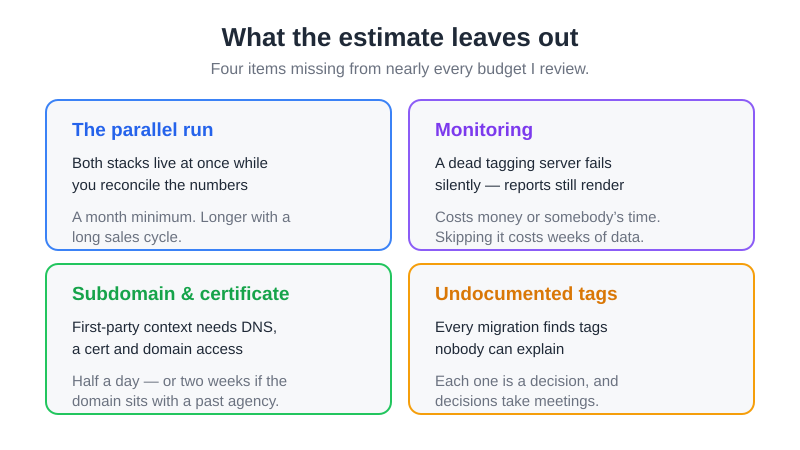
The parallel run. You cannot cut over cold. Both stacks have to run side by side long enough to compare numbers, which means you are paying for client-side and server-side at the same time for several weeks, plus the analyst hours spent reconciling them. Budget a month minimum, longer if your sales cycle is long enough that conversions arrive late.
Monitoring. A tagging server that stops responding fails silently — reports keep rendering, they just render less. Whatever you use for uptime and error alerting either costs money or costs somebody’s time to configure. Skipping it is how a company discovers in week six that it lost two weeks of conversion data.
Subdomain and certificate work. The server has to run in genuine first-party context on your own subdomain, which means DNS changes, a certificate, and a conversation with whoever owns the domain. Half a day if the infrastructure team is responsive. Two weeks if the domain is registered to a former agency.
The tags nobody documented. Every migration I have run uncovered tags in the client-side container that no current employee could explain. Each one is a decision — migrate it, kill it, or leave it client-side — and decisions take meetings. This is the line that turns a two-week project into a six-week one.
When it earns the money back
Cost is only half the question. The case for server-side rests on recovered signal, and that recovery is measurable rather than theoretical.
What you get back: conversions that ad blockers and browser storage limits were eating, cookie lifetimes that survive longer than a client-side script can manage on Safari, and control over what leaves your infrastructure — which matters if your privacy review has ever flagged data sent to a vendor you did not choose. My guide to analytics after cookies covers what that recovery looks like in reporting terms.
What you do not get: any relief from consent obligations. A visitor who denied analytics storage stays denied on the server too, and moving collection does not change the legal basis. I have watched two teams budget for server-side expecting their consent-driven data loss to reverse, and it does not.
The honest threshold, from four migrations: server-side starts paying for itself when recovered conversions are worth more per month than the full five-line bill, and that usually requires either meaningful ad spend being optimised on the recovered signal, or a real compliance requirement that has a cost of its own. A company spending very little on paid acquisition rarely clears it on measurement quality alone.
Is server-side tracking worth it for a SaaS company?
The generic answer to that question is written for ecommerce, and it does not transfer. A store recovering 20% of a hundred thousand purchases has an obvious case. A B2B SaaS company recovering 20% of four hundred trial signups has a rounding error, at least until you ask what those signups are worth.
So the SaaS case rests on something different from raw volume recovery. Three things, in the order they usually matter.
The conversion that matters happens weeks after the click. Somebody clicks an ad, starts a trial, and converts to paid thirty or sixty days later — long past the point where any browser storage still remembers where they came from. Sending that paid conversion from your backend, with the click identifier you stored at signup, is the whole reason a SaaS company builds this pipeline. Recovering ad-blocked page views is a side effect.
The value you report can be the contract, not the signup. Once conversions leave from your own systems you can attach what the account is actually worth instead of counting every trial as one unit. Ad platforms optimise against the number you feed them, and feeding them a flat trial count is how a channel that brings in cheap unqualified signups keeps winning budget it should not have.
Two conversions, one identity. Self-serve and sales-led paths usually get measured by different systems that disagree, and a server-side pipeline is the point where they can be made to agree — provided somebody owns the identifier. That last clause is not optional, and it is the part most projects underestimate.
Against that, the honest cases where it does not pay. Paid acquisition under a few thousand a month: the recovered signal cannot move a budget that small by enough to cover the bill. A CRM that already imports offline conversions on a schedule that everybody trusts: you have solved the delayed-conversion problem without a tagging server, and adding one buys you tidiness. And any team where nobody will own the container after launch — that ends as a silent outage inside a quarter, which costs more than never starting.
None of this pays anything if the recovered signal lands nowhere. The conversions have to reach a model someone reads before a budget decision; the rest of my writing on SaaS attribution is about that half of the problem.
Managed provider or your own container
Both are legitimate, and the decision is about where you want the cost to sit rather than how much it is.
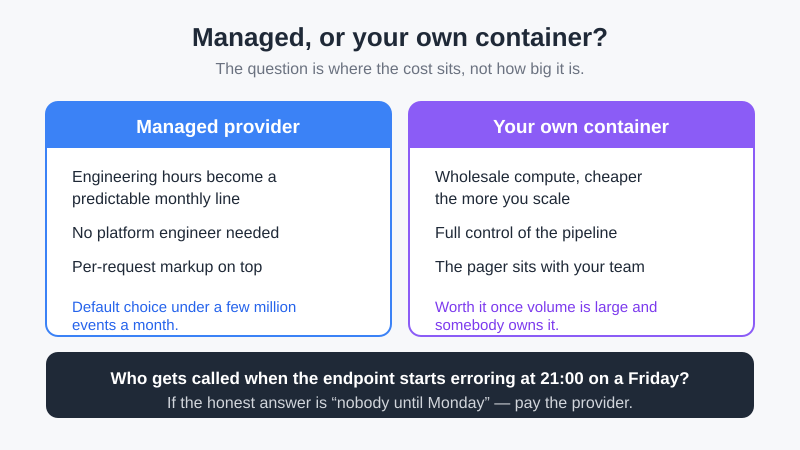
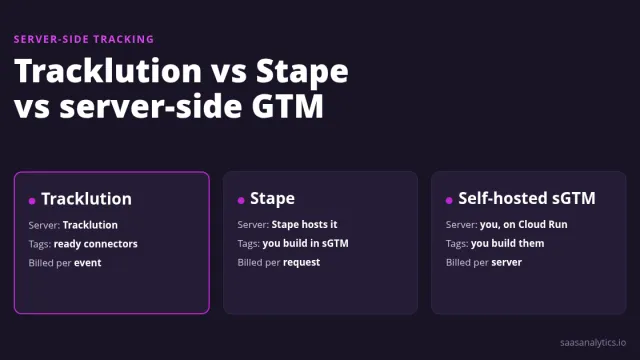
A managed provider converts engineering hours into a predictable monthly line. That trade is good value for a marketing team without a platform engineer, and it is the setup I recommend for most companies under a few million monthly events. The tools worth shortlisting are in my roundup of server-side tracking tools.
Running your own container is cheaper on paper and gets cheaper as you scale, because you are paying wholesale compute instead of a per-request markup. It also puts the pager on your team. Ask one question before choosing it: who gets called when the endpoint returns errors at nine on a Friday evening? If the honest answer is “nobody, until Monday”, pay the provider.
The cost that stays constant either way is the tag audit at the start. Doing it properly means knowing what you currently collect and why, which is the same inventory I describe in my analytics audit checklist. Skipping it is what turns the fan-out into a bill nobody predicted.
Common questions
Is server-side tracking cheaper than client-side?
No. Client-side collection costs you nothing beyond the tags themselves, because the visitor’s browser does the work. Server-side moves that work onto infrastructure you pay for. The case for it is recovered signal and data control, and the comparison worth running is recovered conversion value against the full bill, not one hosting line against zero.
How much traffic before the price becomes a real number?
The compute lines stay small for most mid-sized sites; what scales is the fan-out. Multiply page views by destinations before you assume you are in the cheap tier — a modest site forwarding to five platforms generates more billable events than a busy one forwarding to a single destination.
Do I still need the client-side container?
Usually yes. Some tags cannot move server-side, and the client container remains the thing that collects the event and passes it on. Plan for both to exist rather than treating server-side as a replacement, and budget the ongoing maintenance of two containers instead of one.
What does the first year cost compared to steady state?
Year one carries setup, migration and the parallel run, so it runs well above the ongoing rate — in my four projects, roughly double. Quoting the steady-state figure to a finance team and then returning with year-one reality is how these projects lose support in month three. Say both numbers at the start.
Is there a server-side tracking ROI calculator worth using?
The ones published by vendors calculate their own bill, which is a different question from your return. The version that works is two lines in a spreadsheet: recovered conversions per month multiplied by what a conversion is genuinely worth to you, multiplied by the share of that value you can act on, set against the full five-line bill with a monthly allowance for somebody’s time. Any calculator that asks only for page views is pricing hosting, not return.
Can I run it on my existing servers?
Technically yes, and I have seen it done on infrastructure a team already operated. It stops being a saving the moment tracking traffic starts competing with your product for resources, and debugging a shared box during an incident is unpleasant. Isolation is worth the separate line.
Before you sign anything
Write down your monthly page views, your destination count, and the honest answer to who maintains this in six months. Those three numbers decide the shape of the bill more than any vendor comparison will, and two of them have nothing to do with pricing pages.
Then price it with today’s published rates rather than a figure from an article — including this one. Every number in this space has a shelf life of about a quarter, which is exactly why I have not printed any.

Lukas Reinhardt
10+ years building analytics stacks for SaaS companies.
More about me →