Third-party cookies are dying. iOS tracking restrictions keep tightening. Ad blockers now affect over 30% of web traffic. If you’re still relying solely on client-side tracking, you’re flying blind — missing 20-40% of your conversion data.
Server-side tracking moves data collection from the browser to your server, bypassing ad blockers and giving you control over what data gets sent where. I’ve implemented server-side tracking for dozens of marketing teams, and the difference in data accuracy is substantial.
But not every tool fits every team. Some require serious technical chops. Others lock you into specific platforms. In this guide, I’ll break down the 7 best server-side tracking tools based on hands-on testing — covering what each does well, where they fall short, and who should actually use them.
Quick Comparison Table
| Tool | Best For | Starting Price | Technical Level | Key Strength |
|---|---|---|---|---|
| Stape | GTM power users | $20/month | Intermediate | Managed sGTM hosting |
| Elevar | Shopify stores | $150/month | Beginner | One-click ecommerce setup |
| JENTIS | Enterprise compliance | €499/month | Intermediate | Advanced data governance |
| Tracklution | Performance marketers | €31/month | Beginner | No-code conversion recovery |
| Segment | Data infrastructure | Free tier available | Advanced | 300+ integrations |
| Piwik PRO | Privacy-first analytics | Free (500K actions) | Intermediate | Full analytics + compliance |
| Google sGTM | Google ecosystem | Free (hosting costs) | Advanced | Native GA4 integration |
1. Stape — Best for GTM Power Users
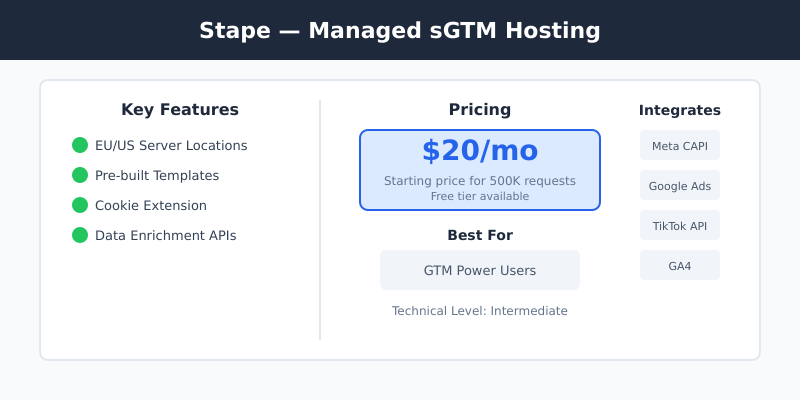
Stape handles the infrastructure headache of running server-side Google Tag Manager. Instead of provisioning your own Google Cloud servers, Stape gives you managed hosting with a visual interface for configuring your sGTM container.
I’ve set up Stape for multiple clients who wanted server-side tracking without hiring a DevOps engineer. The setup takes about 30 minutes if you’re familiar with GTM, and their template library covers most common use cases — Meta CAPI, Google Ads Enhanced Conversions, TikTok Events API.
Key Features
- Managed sGTM hosting with EU and US server locations
- Pre-built templates for major ad platforms
- Cookie extension to bypass ITP limitations
- Data enrichment and transformation APIs
Pricing
Free tier for testing. Paid plans start at $20/month for 500K requests. Scales based on server requests — high-traffic sites can expect $100-300/month.
| Pros | Cons |
|---|---|
|
|
Who Should Use Stape
Marketing teams already using GTM who want server-side benefits without managing infrastructure. Ideal if you have someone comfortable with tag management.
Who Should Skip It
Complete beginners to tag management, or teams who need turnkey attribution — Stape is infrastructure, not analytics. For attribution, you’ll need a separate marketing attribution tool.
2. Elevar — Best for Shopify Stores
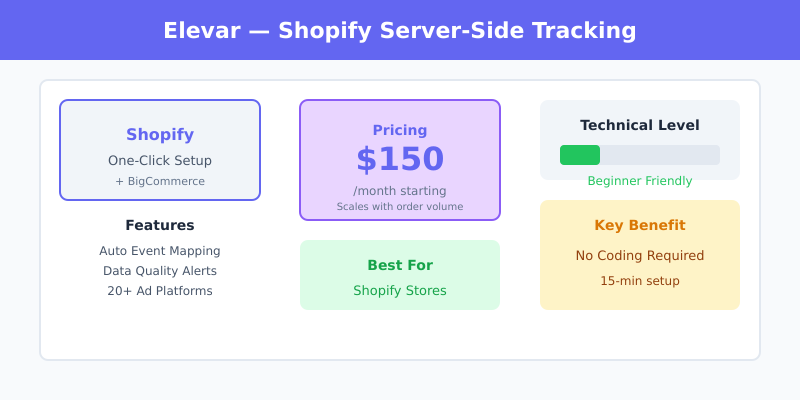
Elevar specializes in server-side tracking for ecommerce, with deep Shopify and BigCommerce integrations. The platform automatically implements GA4, Meta CAPI, TikTok Events API, and other tracking pixels through server-side architecture.
When I configured Elevar for a Shopify Plus store, the setup was remarkably smooth — about 15 minutes to connect and start seeing data. Their automatic event mapping handles product views, add-to-carts, and purchases without custom code.
Key Features
- One-click Shopify/BigCommerce integration
- Automatic ecommerce event mapping
- Data quality alerts and monitoring
- Pre-built connections to 20+ ad platforms
Pricing
Plans start at $150/month for stores up to 2,000 orders. Scales based on order volume — high-volume stores pay $500+/month. Watch out for onboarding fees on some plans.
| Pros | Cons |
|---|---|
|
|
Who Should Use Elevar
Shopify and BigCommerce stores that want accurate conversion tracking without technical implementation. Best for stores doing 1,000+ orders/month where tracking accuracy directly impacts ad spend.
Who Should Skip It
Non-ecommerce businesses, custom-built stores, or small stores where the monthly cost exceeds the value of improved tracking.
3. JENTIS — Best for Enterprise Privacy Compliance
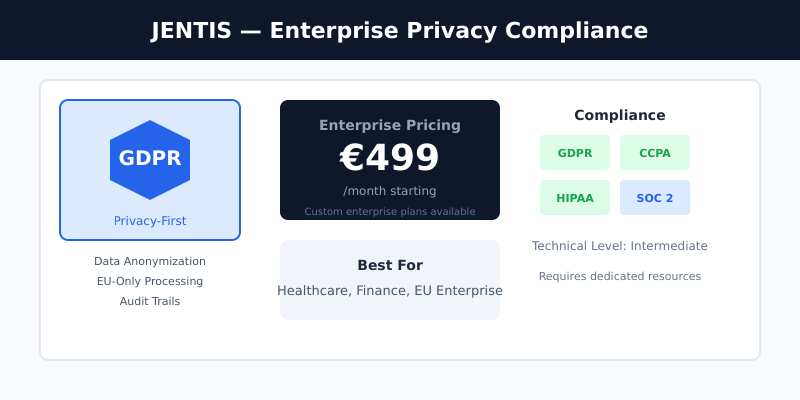
JENTIS is built for organizations where data privacy isn’t optional — think healthcare, finance, and EU-based companies under strict GDPR enforcement. The platform provides granular control over data flows with built-in anonymization and consent management.
I’ve recommended JENTIS to clients in regulated industries where a data breach could mean significant fines. The platform’s approach to data governance goes beyond basic compliance — you control exactly what data leaves your infrastructure.
Key Features
- Advanced data anonymization and pseudonymization
- EU-only data processing option
- Granular consent mode integration
- Audit trails for compliance documentation
Pricing
Starting at €499/month. Enterprise plans with dedicated support run significantly higher. This is not a budget option — it’s priced for organizations where compliance is a business requirement.
| Pros | Cons |
|---|---|
|
|
Who Should Use JENTIS
Enterprise organizations in regulated industries, EU-based companies with strict GDPR requirements, or any business where data privacy violations carry significant risk.
Who Should Skip It
SMBs, startups, or any team where €499+/month doesn’t make sense for the compliance benefits.
4. Tracklution — Best for Performance Marketers
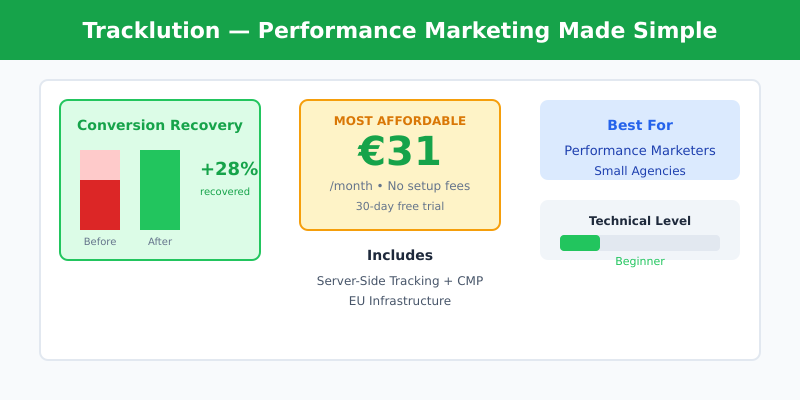
Tracklution targets performance marketers who need better conversion data without the technical complexity. The platform combines server-side tracking with a consent management platform, offering a plug-and-play solution.
What caught my attention during testing is the conversion recovery metrics — Tracklution shows you exactly how many conversions you’re recovering compared to client-side tracking. For one client, we saw a 28% increase in reported conversions.
Key Features
- Combined server-side tracking + CMP
- Conversion recovery reporting
- No-code setup with 30-day trial
- EU infrastructure for GDPR compliance
Pricing
Starting at €31/month with no setup fees. Pricing is straightforward without usage-based surprises — a refreshing approach compared to competitors.
| Pros | Cons |
|---|---|
|
|
Who Should Use Tracklution
Performance marketers and small agencies who want quick server-side implementation with built-in consent management. Great for teams running paid ads who need better conversion data fast.
Who Should Skip It
Teams needing advanced data transformations or extensive custom integrations.
5. Segment — Best for Data Infrastructure
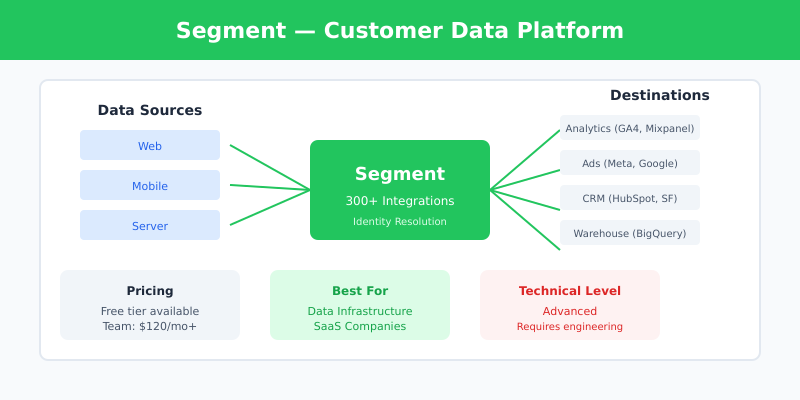
Segment (now part of Twilio) isn’t just a tracking tool — it’s a customer data platform that routes data from any source to any destination. With 300+ pre-built integrations, it’s the choice for companies building sophisticated data infrastructure.
I’ve implemented Segment for SaaS companies that need to unify data across web, mobile, and backend systems. The flexibility is unmatched, but so is the complexity — this isn’t a tool you set up in an afternoon.
Key Features
- 300+ pre-built source and destination integrations
- Real-time data routing and transformation
- Identity resolution across devices
- Data warehouse integrations (BigQuery, Snowflake)
Pricing
Free tier for up to 1,000 visitors/month. Team plan starts at $120/month. Business plans with advanced features start at $1,000+/month. Pricing scales with monthly tracked users (MTUs).
| Pros | Cons |
|---|---|
|
|
Who Should Use Segment
Companies with complex data needs across multiple tools, SaaS businesses tracking user journeys across web and product, or teams building a unified customer data platform.
Who Should Skip It
Small businesses, teams without engineering resources, or anyone who just needs basic conversion tracking.
6. Piwik PRO — Best for Privacy-First Analytics
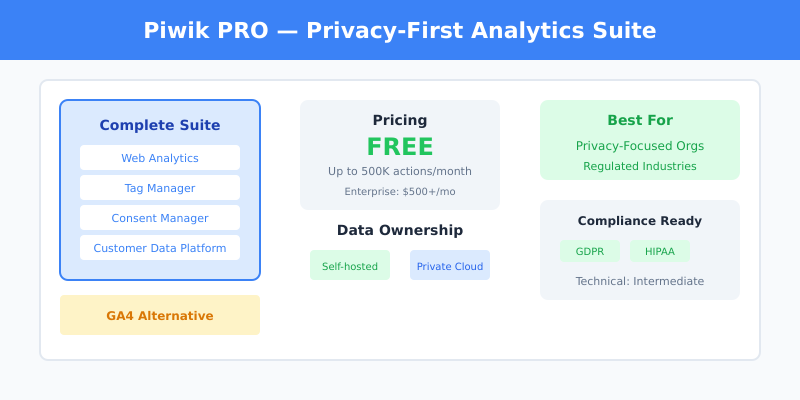
Piwik PRO combines full analytics capabilities with enterprise-grade privacy features. Unlike pure tracking tools, it includes dashboards, reports, and a tag manager — a complete GA4 alternative with better privacy controls.
When I set up Piwik PRO for a healthcare client, the ability to keep all data within EU borders was the deciding factor. The platform integrates with sGTM or JENTIS for server-side collection while providing analytics natively.
Key Features
- Full analytics suite (not just tracking)
- Self-hosted or private cloud options
- Built-in consent manager
- Customer data platform module
Pricing
Free Core plan for up to 500,000 actions/month. Enterprise plans start at $500+/month with custom pricing based on data volume and features.
| Pros | Cons |
|---|---|
|
|
Who Should Use Piwik PRO
Organizations that want to replace Google Analytics with a privacy-focused alternative, companies needing data residency controls, or teams in regulated industries.
Who Should Skip It
Teams deeply invested in the Google ecosystem, or those who only need server-side tracking (not a full analytics platform).
7. Google Server-side Tag Manager — Best Free Option
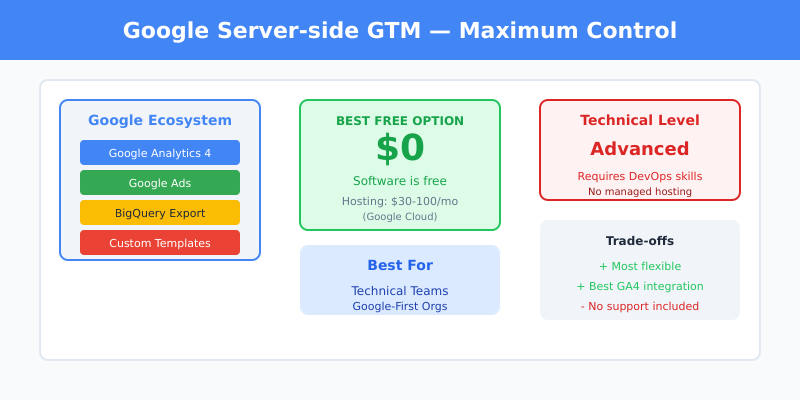
Google’s server-side GTM extends the familiar Tag Manager into a hybrid client-server architecture. It’s free to use, but you’ll pay for the cloud hosting — typically Google Cloud Run or App Engine.
I’ve deployed sGTM directly for clients who wanted maximum control and were comfortable with Google Cloud. The flexibility is excellent, but expect to spend time on configuration and maintenance.
Key Features
- Native integration with GA4 and Google Ads
- Full customization via custom templates
- BigQuery export for raw data analysis
- Community template gallery
Pricing
The software is free. Hosting costs typically run $30-100/month for moderate traffic on Google Cloud. High-traffic sites can see $200+/month in hosting costs.
| Pros | Cons |
|---|---|
|
|
Who Should Use Google sGTM
Teams with technical resources who want maximum control and are already invested in Google’s ecosystem. Best for organizations with developers who can maintain the infrastructure.
Who Should Skip It
Non-technical teams, anyone wanting managed infrastructure, or teams that need hands-on support.
How to Choose the Right Server-Side Tracking Tool
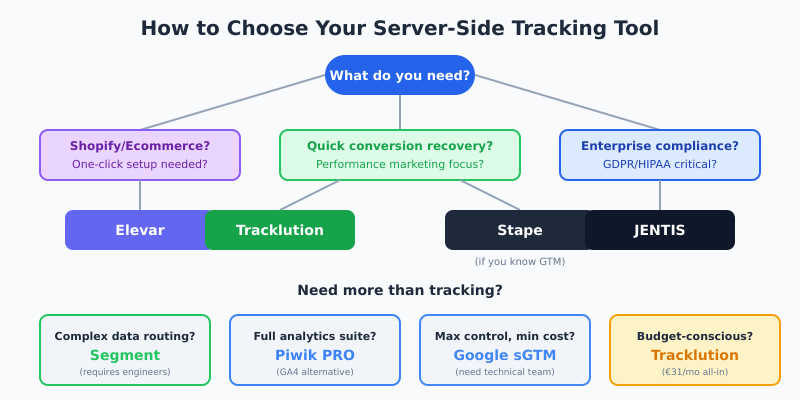
After testing these tools across different client scenarios, here’s my framework for choosing:
Start With Your Primary Use Case
Running a Shopify store? Start with Elevar. The ecommerce-specific features and one-click setup save significant time compared to general-purpose tools.
Need quick conversion recovery for ad campaigns? Try Tracklution. The low price point and built-in CMP make it the fastest path to better data for performance marketers.
Want flexibility with GTM? Stape gives you managed sGTM hosting without the DevOps overhead. Good middle ground between DIY and fully managed.
Building data infrastructure? Segment is the choice for companies routing data to multiple destinations. Overkill for simple tracking, essential for complex architectures.
Strict compliance requirements? JENTIS or Piwik PRO depending on whether you need just tracking (JENTIS) or full analytics (Piwik PRO).
Maximum control, minimum cost? Google sGTM — if you have the technical resources to maintain it.
Consider Your Technical Resources
Be honest about your team’s capabilities. Tools like Segment and Google sGTM require engineering time to implement and maintain. If you don’t have that, paying more for Elevar or Tracklution will save money in the long run.
Don’t Forget Campaign Tracking
Server-side tracking is only one piece of the puzzle. For accurate data, make sure you’re also using proper UTM parameters on all your campaigns so traffic is correctly categorized in your analytics platform.
“Without data, you’re just another person with an opinion.”
— W. Edwards Deming
FAQ
What is server-side tracking and why does it matter?
Server-side tracking collects data on your server before sending it to analytics platforms, rather than relying on browser-based JavaScript. This bypasses ad blockers, reduces data loss from browser restrictions, and gives you control over what data gets shared with third parties.
How much conversion data can server-side tracking recover?
Most implementations recover 20-40% of conversions that client-side tracking misses. The exact amount depends on your audience’s ad blocker usage and browser privacy settings. I’ve seen recovery rates as high as 35% for sites with tech-savvy audiences.
Do I need server-side tracking if I’m GDPR compliant?
GDPR compliance and server-side tracking solve different problems. Server-side tracking improves data accuracy; GDPR compliance ensures you handle data legally. However, server-side tracking can help with compliance by giving you more control over data flows and what information leaves your infrastructure.
Can I use server-side tracking with Google Analytics 4?
Yes. GA4 works well with server-side tracking through Google’s server-side Tag Manager or third-party tools like Stape and Elevar. Server-side implementation actually improves GA4 data quality by reducing the impact of ad blockers and browser restrictions.
What’s the difference between server-side tracking and first-party data?
Server-side tracking is a method of collecting data; first-party data is data collected directly from your users. Server-side tracking typically produces first-party data because it’s collected on your domain, which is why it’s more reliable than third-party cookie-based tracking.
Final Verdict
Server-side tracking isn’t optional anymore — it’s necessary for accurate marketing measurement in 2026. The question is which tool fits your specific situation.
For most marketing teams, I recommend starting with Stape or Tracklution — they offer the best balance of capability and simplicity. Ecommerce stores should look at Elevar first. Enterprise teams with compliance requirements should evaluate JENTIS or Piwik PRO.
Whatever you choose, the investment in server-side tracking pays off quickly through better ad optimization, more accurate multi-touch attribution, and reduced wasted spend on audiences you can’t properly measure.

Leave a Reply