

Third-party cookies are not dead yet, but they are on life support. After years of delays, deprecation timelines, and half-measures, we have arrived at a point in 2026 where relying on third-party cookies for analytics is a liability. The question is no longer “when will cookies go away?” but “what actually works instead?”
I have spent the last two years migrating SaaS clients off cookie-dependent analytics stacks. Some approaches worked brilliantly. Others were expensive failures. Here is what I have learned about cookieless analytics in practice, not theory.
The Current State of Cookieless Analytics
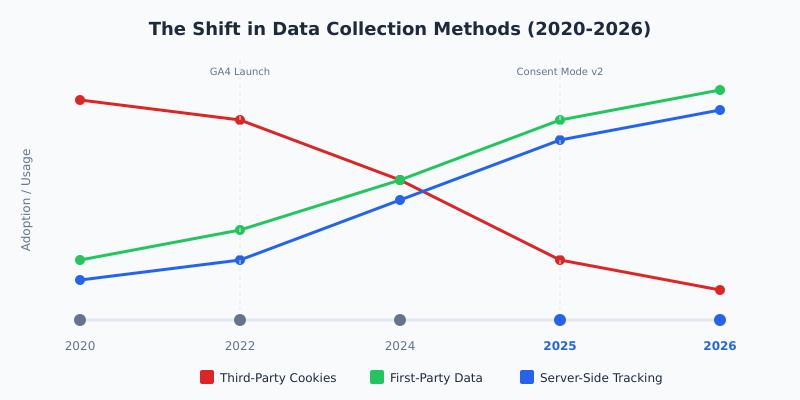
Let me be direct: the transition away from third-party cookies has been messier than anyone predicted. Google’s Privacy Sandbox continues to evolve but remains far from a complete replacement. Safari and Firefox eliminated third-party cookies years ago. Chrome’s approach has shifted from full deprecation to a user-choice model, but the trajectory is clear: the old way of tracking users across the web is ending.
For SaaS marketing teams, this matters enormously. Attribution, retargeting, audience building, and conversion tracking all relied heavily on third-party cookies. According to Google’s Privacy Sandbox documentation, the new APIs are designed to “reduce cross-site and cross-app tracking while helping to keep online content and services free for all.” Noble goal. Messy execution.
The real impact? Most SaaS teams I work with have seen 20-40% data loss in their analytics since tightening consent requirements and losing cross-site tracking capabilities. That is not a rounding error. That is a strategic blind spot.
What Actually Works: Six Approaches Tested
After implementing cookieless analytics solutions for over 30 SaaS companies, I can categorize the available approaches into those that deliver real results and those that sound good in vendor pitches but fall apart in practice.
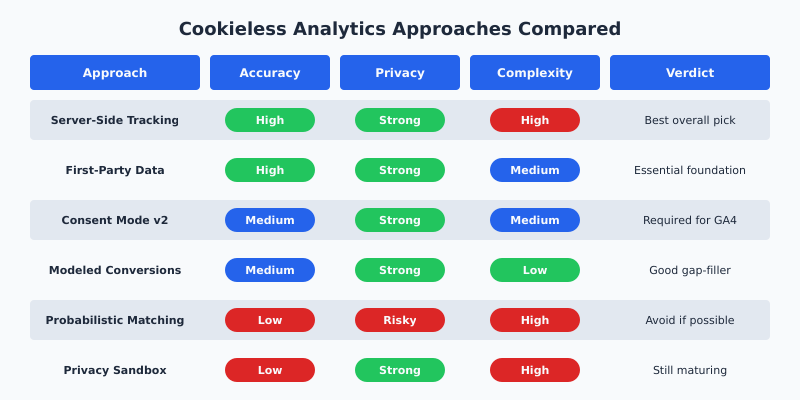
1. Server-Side Tracking: The Clear Winner
Server-side tracking has emerged as the single most effective replacement for cookie-based client-side tracking. Instead of relying on JavaScript tags in the browser (where ad blockers, cookie restrictions, and ITP wreak havoc), server-side tracking moves data collection to your own infrastructure.
The implementation typically involves Google Tag Manager Server-Side, deployed on Google Cloud Run or a similar container service. Events fire from the browser to your first-party domain, then your server forwards them to analytics platforms.
What makes this approach powerful for SaaS teams:
- Data collection happens on your domain, so it is first-party by definition
- Ad blockers cannot intercept server-to-server communication
- You control what data gets sent to each vendor
- Cookie lifetimes extend from 7 days (ITP) to the full duration you set
- Data accuracy improves by 15-30% compared to client-side-only setups
The downside is complexity. A proper server-side GTM deployment requires infrastructure management, DNS configuration, and ongoing maintenance. For a mid-stage SaaS company, expect $200-500/month in hosting costs and a meaningful engineering investment upfront.
I migrated a B2B SaaS client to server-side tracking last year and their reported conversion volume increased by 27% with no actual change in real conversions. They were simply capturing data that client-side tracking was missing.
2. First-Party Data Strategies: The Essential Foundation
Every cookieless analytics strategy must be built on a foundation of first-party data. This means data that your users intentionally provide: email addresses, account information, product usage events, and form submissions.
For SaaS companies, this is actually an advantage over e-commerce or media businesses. Your users log in. They have accounts. They generate product analytics data naturally. The challenge is connecting that data to your marketing analytics.
Practical implementation looks like this:
- Implement a Customer Data Platform (CDP) like Segment or RudderStack to unify first-party events
- Pass hashed email addresses to advertising platforms via their server-side APIs
- Use Google’s Enhanced Conversions to match conversion data without cookies
- Build authenticated user journeys where users identify themselves early in the funnel
The SaaS teams seeing the best results are the ones that invested in first-party data infrastructure before they absolutely needed it. If you are still running your analytics purely off client-side tag managers, you are already behind.
3. Consent Mode v2: Required, Not Optional
Google’s Consent Mode v2 is no longer a nice-to-have. Since March 2024, it has been required for any company serving ads in the European Economic Area. But its impact extends well beyond compliance.
Consent Mode v2 works by sending “cookieless pings” to Google even when users decline cookies. These pings contain no personal identifiers but do carry basic behavioral signals: page loads, conversions, and ad interactions. Google then uses machine learning to model the behavior of non-consenting users based on patterns from consenting ones.
In my testing across multiple SaaS sites, Consent Mode v2 in “Advanced” mode recovered approximately 60-70% of the conversion data that would otherwise be lost from users who decline consent. That is significant, but it comes with caveats:
- Modeled data is an estimate, not ground truth
- It only works within Google’s ecosystem (GA4, Google Ads)
- You need sufficient consenting traffic for the modeling to be accurate
- Implementation requires a compatible Consent Management Platform
4. Privacy-Preserving Measurement
This category includes techniques like differential privacy, aggregated reporting, and on-device processing. Apple’s SKAdNetwork and Google’s Attribution Reporting API fall into this bucket.
The promise is compelling: measure campaign effectiveness without tracking individual users. The reality in 2026 is that these tools are functional but limited. SKAdNetwork (now on version 5) provides campaign-level conversion data for iOS apps, but with significant delays and reduced granularity compared to what marketers were used to.
For SaaS web analytics specifically, the Attribution Reporting API from the Privacy Sandbox is the most relevant. It allows event-level and summary reports for ad attribution without third-party cookies. However, adoption remains low and the data is intentionally noisy to protect privacy.
5. Modeled Conversions: Better Than Nothing
Modeled conversions use machine learning to estimate conversion events that could not be directly observed. GA4 does this automatically when consent gaps or cross-device limitations create holes in your data.
From my experience, modeled conversions in GA4 are directionally useful but not precise enough for granular optimization. They work well for understanding overall trends and making budget allocation decisions at the channel level. They do not work well for A/B test analysis or individual campaign optimization where precision matters.
The key requirement: you need a baseline of observed conversions for the model to learn from. Google recommends a minimum of 1,000 ad clicks and 50 conversions per day for reliable modeling. Many SaaS companies do not hit those thresholds, which makes the modeled data less trustworthy.
6. Probabilistic Matching: Proceed with Caution
Probabilistic matching uses signals like IP addresses, device types, screen resolutions, and browser configurations to create a “fingerprint” that identifies users across sessions without cookies. Several vendors market this aggressively as the solution to cookie deprecation.
I am going to be blunt: be very careful here. While probabilistic matching can improve match rates, it sits in a legal gray area under GDPR and similar regulations. The UK ICO’s guidance on cookies and similar technologies makes clear that fingerprinting is subject to the same consent requirements as cookies. The ePrivacy Directive takes a similarly strict view.
Beyond legality, accuracy is mediocre. In my testing, probabilistic matching correctly identified returning users about 50-60% of the time on desktop and performed worse on mobile. For the legal risk you take on, the data quality does not justify the approach.
What Does Not Work (Despite the Hype)
Let me save you some money and frustration. These approaches are frequently pitched but rarely deliver:
Universal IDs and identity graphs. Solutions like Unified ID 2.0 promised a post-cookie identity layer for the open web. In practice, adoption has been limited, user opt-in rates are low, and the coverage is nowhere near comprehensive enough for reliable analytics. They work better for large publishers than for SaaS analytics.
Blockchain-based analytics. Yes, some vendors are still pitching this. No, it does not solve the fundamental consent and tracking problem. It adds complexity without meaningful privacy or accuracy improvements.
“AI-powered” cookie alternatives. Many vendors have rebranded fingerprinting or probabilistic matching as “AI-powered cookieless tracking.” Strip away the marketing and you often find the same techniques with the same legal and accuracy problems.
Building a Practical Cookieless Analytics Stack
Based on two years of implementation work, here is the stack I recommend for SaaS marketing teams that want accurate measurement while respecting user privacy.
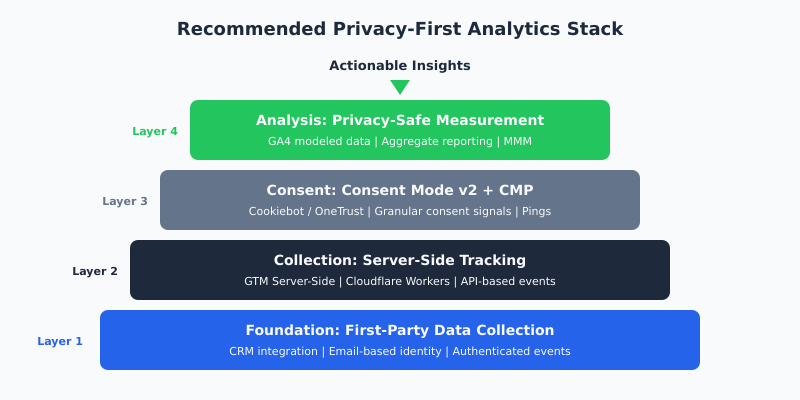
Layer 1: First-Party Data Foundation
Start here. Integrate your CRM, product analytics, and marketing platforms around a shared first-party identity (typically email or account ID). A CDP like Segment, RudderStack, or Jitsu makes this manageable. Without this layer, everything above it becomes guesswork.
Layer 2: Server-Side Collection
Deploy server-side GTM or an equivalent solution (Cloudflare Zaraz is a compelling alternative that reduces infrastructure overhead). Route all tracking through your first-party domain. This immediately recovers data lost to ad blockers and browser restrictions.
Cloudflare Zaraz deserves special mention: it runs third-party tools at the edge on Cloudflare’s network, eliminating client-side scripts entirely. For teams already on Cloudflare, it is the lowest-friction path to server-side tracking.
Layer 3: Consent Management
Implement Consent Mode v2 with a reputable CMP. Configure it in Advanced mode to maximize data recovery through modeling. Make sure your consent banner is clear and non-manipulative. Dark patterns in consent UIs are increasingly drawing regulatory attention and erode user trust.
Layer 4: Privacy-Safe Analysis
Use GA4’s modeled data for trend analysis and channel-level reporting. Supplement with marketing mix modeling (MMM) for budget allocation decisions. For precise conversion analysis, rely on your first-party data layer rather than modeled estimates.
Expert Perspectives
“The companies that will thrive in this new landscape are the ones that treat privacy as a product feature, not a compliance burden. First-party data strategies combined with server-side infrastructure give you better data quality than third-party cookies ever did, because you actually own and control the data pipeline.”
Simo Ahava, Senior Data Advocate at Mixpanel and widely recognized Google Tag Manager expert
“We are moving from an era of surveillance-based measurement to one of modeled and consented measurement. It is not worse; it is different. The teams that adapt their mental models, not just their tech stacks, will make better decisions with this new class of data.”
Krista Seiden, founder of KS Digital and former Google Analytics Advocate
My Implementation Playbook
If I were starting from scratch with a SaaS company’s analytics stack today, here is exactly what I would do, in order:
Week 1-2: Audit and baseline. Document what data you are currently collecting, where you are losing it, and what decisions depend on it. Measure your consent rate and ad blocker impact. You cannot improve what you have not measured.
Week 3-4: First-party data infrastructure. Set up or configure your CDP. Map your key events (signups, trials, conversions, expansion) to a consistent schema. Connect your CRM as both a source and destination.
Week 5-6: Server-side deployment. Stand up server-side GTM on Cloud Run or deploy Cloudflare Zaraz. Migrate your core tags (GA4, Google Ads, LinkedIn) to server-side. Run in parallel with client-side for two weeks to validate.
Week 7-8: Consent Mode v2. Deploy your CMP with Consent Mode v2 Advanced. Test thoroughly across geographies. Monitor the impact on your data volume and adjust your consent UX if opt-in rates are below 60%.
Week 9-10: Validation and tuning. Compare your new stack’s data against your CRM source of truth. Calibrate your modeled data. Document the known gaps and uncertainties for your stakeholders.
Total investment for a typical SaaS team: 150-250 engineering hours and $300-800/month in ongoing infrastructure costs. The payoff is analytics data you can actually trust.
What Comes Next
Looking ahead, I see three trends shaping cookieless analytics through the rest of 2026 and beyond:
Privacy regulations will tighten further. The EU’s enforcement of the Digital Markets Act and ongoing ePrivacy Regulation development will create more pressure. US state-level privacy laws continue to proliferate. Building privacy into your analytics stack now is cheaper than retrofitting later.
Server-side tracking will become the default. Within two years, I expect most serious SaaS companies will run server-side tracking as their primary collection method. The tooling is maturing rapidly and costs are declining.
Marketing mix modeling will have a renaissance. As user-level attribution becomes harder, aggregate measurement techniques like MMM are experiencing renewed interest. New tools from companies like Google (Meridian), Meta (Robyn), and startups like Paramark are making MMM accessible to mid-market companies for the first time.
The Bottom Line
Cookieless analytics is not a future problem. It is a current reality. The SaaS teams I see succeeding are the ones that stopped waiting for a magic bullet replacement for third-party cookies and instead built layered stacks combining server-side tracking, first-party data, consent management, and modeled measurement.
Is it more work than dropping a Google Analytics tag on your site and calling it a day? Absolutely. But the data you get is more accurate, more durable, and more respectful of your users’ privacy. That is a trade-off worth making.
Start with the foundation: first-party data and server-side tracking. Get those right, and everything else becomes easier.
Frequently Asked Questions
What is cookieless analytics and why does it matter in 2026?
Cookieless analytics refers to methods of collecting and analyzing website and marketing data without relying on third-party cookies. It matters in 2026 because major browsers have restricted or eliminated third-party cookies, privacy regulations like GDPR and US state laws require explicit consent for tracking, and ad blockers remove traditional tracking scripts. SaaS companies that have not adapted are losing 20-40% of their analytics data, creating blind spots in marketing measurement and business decisions.
How does server-side tracking improve data accuracy?
Server-side tracking improves data accuracy by moving data collection from the user’s browser to your own server infrastructure. This bypasses ad blockers (which block client-side tracking scripts), avoids browser-imposed cookie limitations like Safari’s 7-day ITP cap, and gives you full control over what data is collected and forwarded to analytics vendors. In practice, SaaS companies implementing server-side tracking typically see a 15-30% increase in reported data volume compared to client-side-only setups.
Is Google Consent Mode v2 mandatory for all websites?
Consent Mode v2 is mandatory for any company using Google advertising services (Google Ads, DV360) to target users in the European Economic Area, effective since March 2024. For companies outside the EEA or not running Google ads, it is not strictly required but is strongly recommended. It recovers approximately 60-70% of conversion data from non-consenting users through privacy-preserving modeling, making it one of the most impactful cookieless analytics tools available.
What is the difference between probabilistic matching and fingerprinting?
Probabilistic matching and browser fingerprinting are closely related techniques. Both use non-cookie signals like IP address, device type, screen resolution, and browser version to identify users across sessions. Probabilistic matching typically uses a subset of these signals with statistical models, while fingerprinting attempts to create a unique device identifier from all available signals. Both face the same legal challenges: the UK ICO and EU data protection authorities consider them equivalent to cookies under consent requirements, making them risky approaches for companies operating in regulated markets.
How much does it cost to implement a cookieless analytics stack for a SaaS company?
A comprehensive cookieless analytics stack for a mid-stage SaaS company typically requires 150-250 engineering hours for initial implementation (spread over 8-10 weeks) and $300-800 per month in ongoing infrastructure costs. The major cost components are server-side tracking hosting ($200-500/month on Google Cloud Run or similar), a Consent Management Platform ($50-200/month depending on traffic), and a Customer Data Platform (varies widely, from free tiers to $500+ per month). The ROI comes from recovering 15-30% of previously lost analytics data, which directly improves marketing spend allocation and conversion optimization.